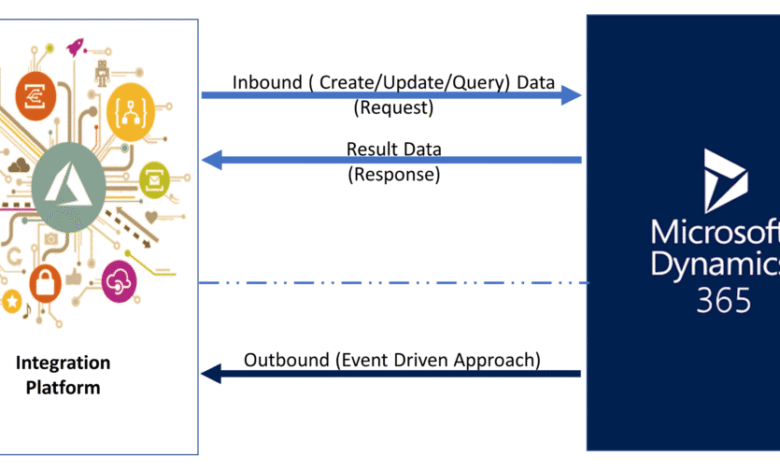
In today’s digital ecosystem, no single software solution can perfectly meet every business need. That’s why businesses using Dynamics 365 CRM often look to extend their capabilities by integrating third-party tools. These integrations can streamline workflows, improve productivity, and create a more connected and efficient business environment.
If your organization is using Dynamics 365 or considering its adoption, it is essential to understand how third-party tool integration works, the benefits, challenges, and best practices. This blog includes everything you need to know about integrating third-party tools with Dynamics 365 CRM to help you get the most out of your investment.
Why Integrate Third-Party Tools with Dynamics 365 CRM?
Dynamics 365 CRM is a powerful platform that combines sales, marketing, and customer service capabilities. However, every business has unique requirements that sometimes go beyond out-of-the-box functionality. Integrating third-party applications enables organizations to:
- Enhance Functionality: Add specialized features not available natively in Dynamics 365, such as advanced analytics, project management, or industry-specific tools.
- Improve Productivity: Automate manual tasks and create seamless workflows across different systems.
- Centralized Data: Bring data from disparate systems into a unified interface, improving decision-making and customer insights.
- Increase Flexibility: Adapt quickly to changing business needs without waiting for platform updates.
Common Types of Third-Party Integrations with Dynamics 365 CRM
When considering third-party integrations, there are several common categories businesses focus on:
- Marketing Automation: Tools like Mailchimp, HubSpot, or ClickDimensions enhance email marketing and lead nurturing directly within Dynamics 365.
- Customer Support Platforms: Integrating with service tools like Zendesk or Freshdesk improves case management and customer satisfaction.
- Accounting and Finance: Synchronizing with QuickBooks or Sage enables smoother invoicing and financial reporting.
- Document Management: Tools such as SharePoint or Dropbox allow for better file storage and collaboration.
- Communication Platforms: Integration with Microsoft Teams or Slack enhances internal communication and collaboration tied to CRM records.
- Analytics and BI: Power BI, Tableau, or other data visualization tools provide deeper insights beyond native reporting.
How Does Integration with Dynamics 365 Work?
Microsoft has designed Dynamics 365 to be highly extensible. There are several methods and tools for integrating third-party applications:
1. API and Web Services
Dynamics 365 offers a comprehensive set of REST APIs and web services that allow external applications to read and write data, trigger workflows, and interact with CRM modules. This approach provides deep, customizable integration but usually requires development expertise.
2. Microsoft Power Platform
The Power Platform—Power Automate, Power Apps, and Power BI—is tightly integrated with Dynamics 365. Power Automate enables workflow automation across hundreds of applications, making it easier for non-developers to build integrations and automate tasks without complex coding.
3. Connectors and Marketplace Apps
The Microsoft AppSource marketplace offers pre-built connectors and third-party apps that can be added to Dynamics 365 with minimal configuration. These solutions cover popular integrations and reduce implementation time.
4. Data Integration Tools
Tools like Azure Data Factory or third-party middleware platforms (e.g., MuleSoft, KingswaySoft) can handle bulk data syncing and complex transformations between Dynamics 365 and other enterprise systems.
Benefits of Integrating Third-Party Tools with Dynamics 365 CRM
a. Streamlined Business Processes
Integrations reduce manual data entry and handoffs between systems, speeding up workflows and reducing errors. For example, integrating your marketing automation platform with Dynamics 365 ensures leads are automatically captured and routed to sales reps.
b. Enhanced Customer Experience
A unified view of customer data from multiple systems empowers sales, marketing, and support teams to deliver personalized experiences and faster resolutions.
c. Better Data Insights
Bringing diverse data into Dynamics 365 or exporting it to analytics platforms allows for richer insights and more informed decision-making.
d. Cost and Time Savings
Automation and streamlined workflows reduce administrative overhead and free employees to focus on strategic tasks, improving ROI on your CRM investment.
Challenges to Keep in Mind
While integrating third-party tools offers numerous benefits, it’s important to be aware of potential challenges:
1. Data Security and Compliance
Exchanging data between systems increases the risk of breaches or non-compliance. Ensure your integrations adhere to security standards, encryption protocols, and compliance requirements like GDPR or HIPAA.
2. Complexity and Maintenance
Custom integrations, especially those requiring development, can be complex to build and maintain. Changes in APIs, platform updates, or third-party software upgrades may need ongoing support.
3. Data Consistency and Quality
Synchronizing data across platforms risks inconsistencies or duplicates if not managed carefully. Defining clear data governance and validation rules is critical.
4. Performance Impact
Improperly designed integrations can slow down system performance or introduce delays affecting user experience.
Best Practices for Successful Integration
To maximize the benefits and minimize risks when integrating third-party tools with Dynamics 365 CRM, consider the following best practices:
Define Clear Objectives
Start by understanding what business problems you want to solve with integration. Define success metrics and align the integration scope with your overall CRM strategy.
Choose the Right Tools
Evaluate third-party applications for compatibility, security, vendor support, and scalability. For easier implementation, prefer solutions that offer native connectors to Dynamics 365.
Leverage Microsoft Ecosystem
Use Microsoft’s native tools like Power Automate and AppSource whenever possible to reduce complexity and future-proof your integrations.
Plan for Data Governance
Establish data standards, roles, and validation rules to maintain data accuracy and consistency across platforms.
Test Thoroughly
Before going live, conduct rigorous testing across various scenarios to catch any data sync issues or performance bottlenecks.
Monitor and Optimize
Integration is not a one-time project. Monitor system performance and user feedback to refine workflows and adapt to evolving business needs.
Real-World Use Case: Dynamics 365 CRM + Marketing Automation
A retail company integrated its email marketing platform with Dynamics 365 CRM to automatically capture online leads and segment customers based on purchase history. Using Power Automate, they triggered personalized email campaigns directly from CRM data.
This integration boosted lead conversion rates by 30%, improved customer retention, and reduced marketing teams’ manual data entry, showcasing how a well-designed integration can transform business outcomes.
Conclusion
Integrating third-party tools with Dynamics 365 CRM offers a strategic way to extend the platform’s functionality, improve operational efficiency, and deliver better customer experiences. By leveraging APIs, Microsoft Power Platform, and pre-built connectors, businesses can create a seamless ecosystem tailored to their unique needs.
However, integration also demands careful planning around security, data governance, and ongoing maintenance to ensure success. When done right, these integrations unlock Dynamics 365‘s full potential, helping organizations innovate, scale, and stay competitive in a rapidly evolving market.
If you’re considering expanding your Dynamics 365 CRM capabilities with third-party tools, partner with experts who understand your business and the technical landscape to build integrations that truly deliver value.